Grid Search vs Random Search: Which One Should You Use?
In machine learning, hyperparameters are like settings that control how well a model performs. Choosing the right ones can make the difference between an average model and a great one. But when it comes to finding the best hyperparameters, many data scientists face a common question: Should you use Grid Search or Random Search?
Should you meticulously evaluate every possible combination of hyperparameters using Grid Search, or take a chance on the more time-efficient Random Search? Is it even possible to check every possible hyperparameter combination?
This question often sparks confusion, especially when balancing accuracy, computational cost, and time constraints. More so, because the difference between Random Search and Grid Search is often misunderstood.
In this article, we’ll break down these two popular approaches, explore their trade-offs, and help you decide which method works best for your dataset, model, and goals.
Master grid and random search with our course Hyperparameter Optimization for Machine Learning.
Understanding Grid Search and Random Search
Hyperparameter tuning consists in systematically searching for the best combination of hyperparameter values to boost a model’s performance.
Grid Search and Random Search are hyperparameter tuning techniques that help data scientists efficiently search the vast hyperparameter space, leading to better performance in their models while balancing computational costs.
Grid search picks every possible combination from a provided hyperparameter grid and evaluates the model on all possible hyperparameter combinations.
Random Search, instead, randomly samples from a distribution of hyperparameter values. The number of hyperparameter combinations to test is controlled explicitly.
The key differences between Grid Search and Random Search are:
- In Grid Search we provide a grid with specific hyperparameter values. In Random Search we provide distributions of values for hyperparameters.
- Grid search tests all given hyperparameter values. Random Search samples and tests values at random.
Let’s explore the workings of these methods in more detail.
Grid Search
Grid Search explores all possible combinations from a given hyperparameter grid and identifies the one that results in the best performance of a given machine learning model.
For example, if the grid with hyperparameter values provides 3 values for n_estimators (e.g., 50, 100 and 500), and 3 values for max_depth (e.g., None, 1 and 4), Grid Search will evaluate 3 x 3 hyperparameter combinations, which results in 9 possible configurations.
Grid search evaluates every possible hyperparameter combination from a grid. For each combination, it trains and evaluates a machine learning model using k-fold cross-validation. Then it calculates the average performance across all folds to provide a final score for each combination of hyperparameters.
This score is based on an evaluation metric (i.e., accuracy, precision, etc.) that determines the model’s performance. The hyperparameter combination with the highest score is the winner.
With Grid Search we only need to define the grid with the hyperparameter values.
Random Search
Random Search also tests combinations of hyperparameters from a hyperparameter space to determine the optimal subset. However, there are 2 key differences respect to Grid Search:
- In Random Search, we define the hyperparameter space specifying hyperparameter distributions, instead of specific values.
- Random search, tests values extracted at random from each distribution.
- For Random Search, we also need to specify the number of combinations to test.
With Random Search, we need to define the grid with the hyperparameter distributions AND the number of hyperparameter combinations to examine.
Instead of trying all possible combinations, Random Search randomly selects a specified number of combinations from a distribution of hyperparameter values. These distributions can be anything like a range of values between 0 and 1 with a uniform distribution, or a normal distribution with a certain mean and standard deviation. For categorical hyperparameters, the values can be explicitly set by the user, and then Random Search will sample them randomly.
Random Search leads to faster results while still finding optimal or near-optimal hyperparameters, especially when the search space is large. By randomly sampling hyperparameters from a distribution of values, it explores the space more broadly, uncovering better-performing combinations without testing every single possibility.
The number of random hyperparameter combinations to test is defined by the user and controlled through the parameter “n_iter” if using scikit-learn. This allows users to balance computational cost and the thoroughness of the search. The higher the number of combinations to test, the greater the likelihood of finding better hyperparameters, at the cost of computation time.
Studies showed that by allowing the Random Search to test 60 possible combinations, Random Search finds optimal solutions for most machine learning models.
The procedure to test the hyperparameter combinations is similar to that of Grid Search: it trains a model using a hyperparameter combination with cross-validation and evaluates them using a specific performance metric.
Due to random sampling of hyperparameters from a distribution, Random Search is computationally efficient in large hyperparameter spaces.
Confused about the difference between Grid Search and Random Search? Our course, Hyperparameter Optimization for Machine Learning, breaks it down with hands-on tutorials and real code examples—so you can apply these techniques with confidence.
Grid Search and Random Search: Application
In this section, we’ll discuss the workings of these algorithms in more detail using a real-world dataset and Python code examples.
1. Loading the Dataset
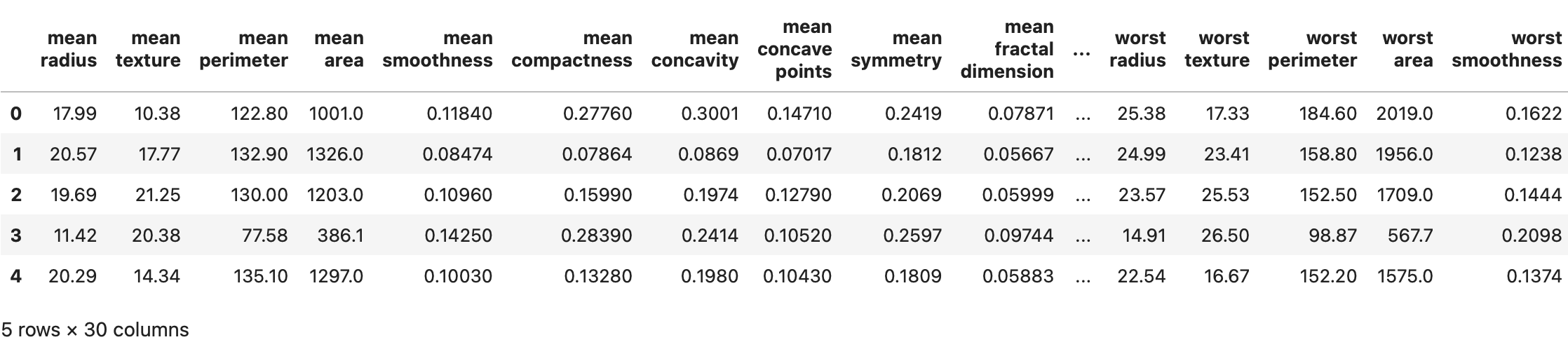
We’ll use the Breast Cancer Wisconsin (Diagnostic) Dataset — a widely used dataset in machine learning for binary classification tasks. This dataset contains 569 instances and 30 numerical features describing the characteristics of cell nuclei obtained from digitized images of fine needle aspirates of breast masses.
The target variable classifies tumors as either malignant (cancerous) or benign (non-cancerous). The features, such as radius, texture, and symmetry, provide detailed information about the shape, size, and structure of the tumor cell nuclei.
Let’s start by loading the necessary libraries and preparing the data for analysis in Python:
# Import necessary libraries
import pandas as pd
import numpy as np
import matplotlib.pyplot as plt
import seaborn as sns

from sklearn.datasets import load_breast_cancer
from sklearn.model_selection import train_test_split
from sklearn.ensemble import RandomForestClassifier
from sklearn.model_selection import GridSearchCV
from sklearn.model_selection import RandomizedSearchCV
from sklearn.metrics import accuracy_score

# Load the dataset
data = load_breast_cancer()
X = pd.DataFrame(data.data, columns=data.feature_names)
y = pd.Series(data.target)

# Split the dataset into training and test sets (80% training, 20% test)
X_train, X_test, y_train, y_test = train_test_split(X, y, test_size=0.2, random_state=42)

X.head()
In the following image, we see the dataset:
2. Defining the Hyperparameter Grid
Now that we have our dataset ready, we need to define a hyperparameter grid that contains the hyperparameters we want to test. We want to tune a Random Forest classifier.
The hyperparameter grid consists of a dictionary containing key-value pairs of hyperparameters and the values we think they can take.
The parameter grid is defined differently for Grid Search and Random Search. In Grid Search, the hyperparameter grid consists of a fixed set of predefined values for each hyperparameter. In Random Search, instead, we define distributions of possible values for each hyperparameter.
In the following code snippet, we define first a grid with hyperparameter values for Grid Search, and after that, a grid with distributions for Random Search:
# Define the Grid Search hyperparameter grid

param_grid_gs = {
    'n_estimators': [50, 100, 150],
    'max_depth': [None, 10, 20, 50],
    'min_samples_split': [2, 5, 10],
    'min_samples_leaf': [1, 2, 4],
    'max_features': ['auto', 'sqrt', 'log2'],
    'bootstrap': [True, False]
}


# Define the Random Search hyperparameter grid

param_grid_rs = {
    'n_estimators': np.random.randint(10, 200, size=3),
    'max_depth': [None] + list(range(5, 21)),
    'min_samples_split': np.linspace(2, 20, num=3, dtype=int),
    'min_samples_leaf': np.linspace(2, 20, num=3, dtype=int),
    'max_features': [None, 'sqrt', 'log2'],
    'bootstrap': [True, False]
}
3. Training and Evaluating the Model
We will use a Random Forest Classifier to predict the target variable for our application. Random Forest is a widely used model for classification tasks, offering a range of hyperparameters that we can tune to enhance performance.
Let’s define the Random Forest model that we want to optimize first:
# Initialize Random Forest Classifier

rf_model = RandomForestClassifier(random_state=42)
Though Random Forests performance is driven mostly by the number and depth of a tree, and therefore a Grid Search is often enough to tune this model, here, we’ll tune hyperparameters both using Grid Searchand Random Search.
To optimize hyperparameters, we’ll use GridSearchCV and RandomizedSearchCV from scikit-learn.
3.1 Model Training and Evaluation with Grid Search
We’ll start by tuning hyperparameters using Grid Search.
# Initialize GridSearchCV with the Random Forest model and the param_grid
grid_search = GridSearchCV(estimator=rf_model,
                           param_grid=param_grid_gs,
                           cv=3,
                           n_jobs=-1,
                           verbose=2)

# Fit the GridSearchCV to the data
grid_search.fit(X_train, y_train)

# Display the best hyperparameters and the best score for Grid Search.
print("Best Hyperparameters from Grid Search:", grid_search.best_params_)
print("Best Score from Grid Search:", grid_search.best_score_)

# Evaluate the model performance on the test set
y_pred = grid_search.predict(X_test)
test_accuracy = accuracy_score(y_test, y_pred)
print(f"Test Accuracy: {test_accuracy:.4f}")
As we know, Grid Search will try all possible combinations of the hyperparameters in the param_grid and evaluate the model’s performance for each of these combinations. That means that, for our param_grid_gs with 6 hyperparameters, each with 3, 4, 3, 3, 3, and 2 different values, the Grid Search algorithm will try 3×4×3×3×3×2=648 different combinations. That is, the algorithm will train a model 648 times with the different hyperparameter combinations.
In addition, this is done using 3-fold cross-validation (cv=3), resulting in training the model a total of 864×3 = 1944 times, which can be seen clearly in the output (see fits below):
Fitting 3 folds for each of 648 candidates, totalling 1944 fits
Best Hyperparameters from Grid Search: {'bootstrap': True, 'max_depth': None, 'max_features': 'log2', 'min_samples_leaf': 1, 'min_samples_split': 2, 'n_estimators': 50}
Best Score from Grid Search: 0.9648106192633903
Test Accuracy: 0.9649
Using the best_params_ and the best_score_ attributes, we can get the optimal hyperparameter combination that resulted in the best model performance. In our case, the hyperparameters ‘bootstrap’: True, ‘max_depth’: None, ‘max_features’: ‘log2’, ‘min_samples_leaf’: 1, ‘min_samples_split’: 2, ‘n_estimators’: 50, resulted in the best score (cross-validation accuracy of 0.9648).
These hyperparameters significantly improved the model’s ability to generalize. When tested on the unseen data, the model achieved a test accuracy of 0.9649, demonstrating the effectiveness of Grid Search in optimizing model performance.
3.2 Model Training and Evaluation with Random Search
We’ll now find the best hyperparameters using Random Search.
# Initialize RandomizedSearchCV with the Random Forest model and param_grid_rs
random_search = RandomizedSearchCV(estimator=rf_model,
                                   param_distributions=param_grid_rs,
                                   n_iter=50,
                                   cv=3,
                                   n_jobs=-1,
                                   verbose=2,
                                   random_state=42)

# Fit the RandomizedSearchCV to the data
random_search.fit(X_train, y_train)

# Display the best hyperparameters and the best score
print("Best Hyperparameters from Random Search:", random_search.best_params_)
print("Best Score from Random Search:", random_search.best_score_)

# Evaluate the model performance on the test set
y_pred_rs = random_search.predict(X_test)
test_accuracy_rs = accuracy_score(y_test, y_pred_rs)
print(f"Test Accuracy: {test_accuracy:.4f}")
Contrary to Grid Search, Random Search tests random combinations of hyperparameters instead of testing all possible combinations.
This is reflected in the output where the model is only trained 150 times (3 folds x 50 combinations). The best hyperparameters include ‘n_estimators’: 33, ‘min_samples_split’: 2, ‘min_samples_leaf’: 2, ‘max_features’: ‘log2’, ‘max_depth’: 15, ‘bootstrap’: False, resulting in a cross-validation accuracy (score) of 0.9582. The test accuracy remained consistent with the Grid Search model at 0.9649:
Fitting 3 folds for each of 50 candidates, totalling 150 fits
Best Hyperparameters from Random Search: {'n_estimators': 33, 'min_samples_split': 2, 'min_samples_leaf': 2, 'max_features': 'log2', 'max_depth': 15, 'bootstrap': False}
Best Score from Random Search: 0.9582316718949692
Test Accuracy: 0.9649
Comparing Grid Search and Random Search
While both Grid Search and Random Search resulted in similar accuracy on the test set, their approaches to hyperparameter optimization are quite different and can be compared on several grounds.
Let’s try to understand the core difference between these approaches:
1. Exploration of Search Space
Grid Search and Random Search differ in their approach to exploring the search space. Grid Search exhaustively tests all combinations of hyperparameters specified in the param_grid. This results in a comprehensive exploration of the search space, where every possible combination is considered.
For instance, in our model, the Grid Search algorithm evaluated all 864 hyperparameter combinations (3x4x3x3x3x2) to find the optimal. While this ensures that no combination is overlooked, it can be computationally expensive, especially when the search space is large.
Random Search, on the other hand, randomly samples from a distribution of values from the search space. This means that while it doesn’t evaluate every possible combination, it still explores the hyperparameter space thoroughly. This approach can be more efficient for high-dimensionality spaces, as it allows for a broader exploration of a larger search space.
We can understand how the search space is explored for Grid Search and Random Search by creating a heatmap visualization :
# Convert the parameter grid into a DataFrame for heatmap
grid_combinations = pd.DataFrame(grid_search.cv_results_['params'])
grid_combinations = grid_combinations.applymap(str)

# Convert all values to string type to ensure uniformity
random_combinations = pd.DataFrame(random_search.cv_results_['params'])
random_combinations = random_combinations.applymap(str)

# Create counts for each hyperparameter combination
grid_counts = grid_combinations.apply(pd.Series.value_counts, axis=0).fillna(0)
random_counts = random_combinations.apply(pd.Series.value_counts, axis=0).fillna(0)

# Plot heatmaps
plt.figure(figsize=(12, 6))

# Grid Search Heatmap
plt.subplot(1, 2, 1)
sns.heatmap(grid_counts, annot=True, cmap='Blues', fmt='g', cbar=True)
plt.title('Grid Search - Hyperparameter Exploration')
plt.ylabel('Parameter Values')
plt.xlabel('Hyperparameters')

# Random Search Heatmap
plt.subplot(1, 2, 2)
sns.heatmap(random_counts, annot=True, cmap='Blues', fmt='g', cbar=True)
plt.title('Random Search - Hyperparameter Exploration')
plt.ylabel('Parameter Values')
plt.xlabel('Hyperparameters')

plt.tight_layout()
plt.show()
These heatmaps show the distribution of hyperparameter combinations explored during Grid Search and Random Search. The color intensity indicates how frequently a particular combination was evaluated, with darker shades representing higher frequencies:
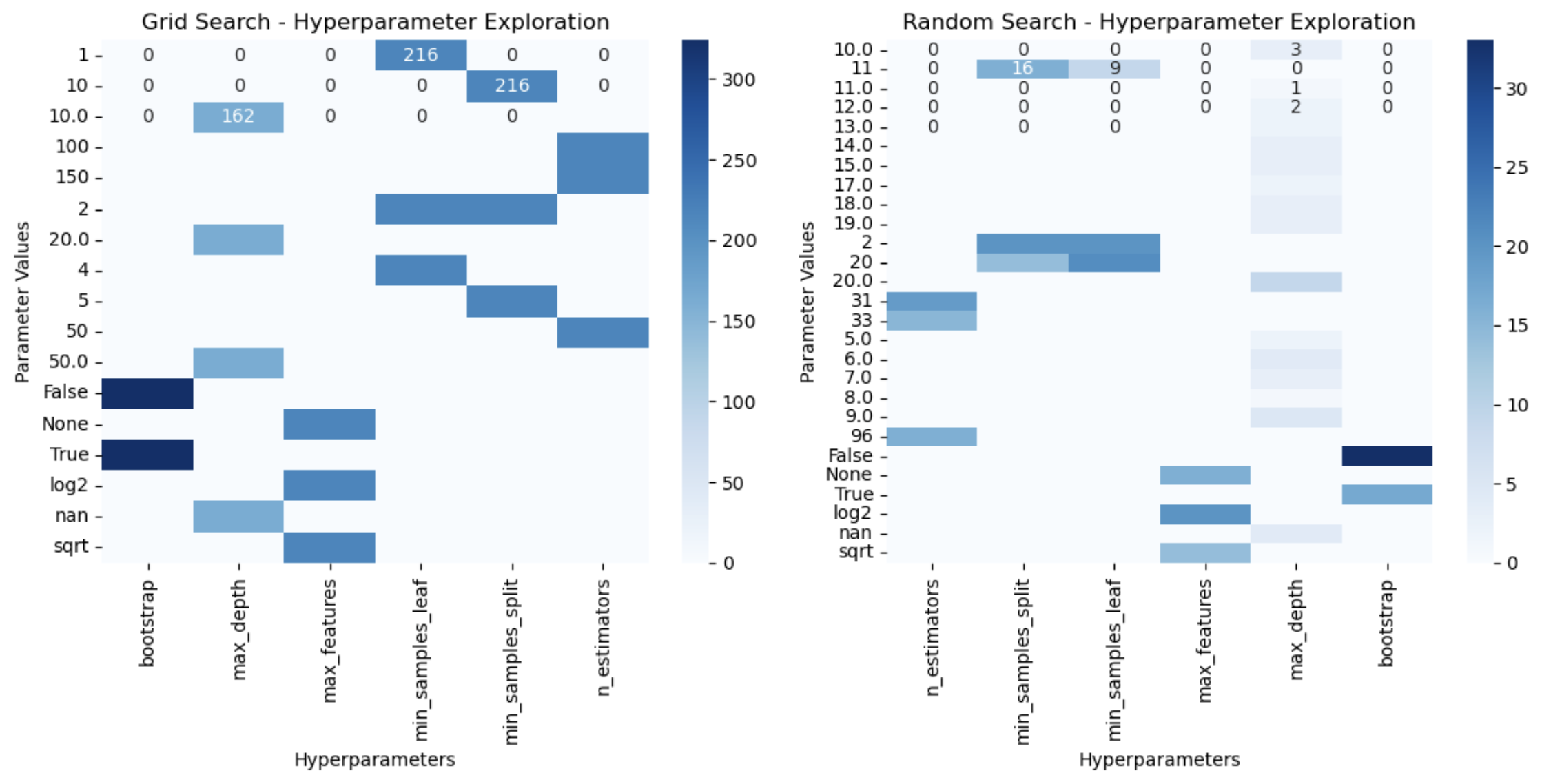
For example, max_depth=10 in Grid Search was explored 162 times, whereas the same was explored only 3 times in Random Search. We can clearly see the exhaustive search process in Grid Search, where every possible combination of hyperparameters is explored almost more than 200 times.
In contrast, Random Search explores a more sparse set of combinations, randomly selecting from the hyperparameter space.
If this value is worthless, Grid Search is wasting time evaluating all possible combinations of it with the other hyperparameters, while Random Search quickly examines other portions of the space.
2. Computational cost
Exhaustive exploration of the hyperparameter search space results in a high computation cost for Grid Search. This can lead to longer training times and increased resource usage, particularly when the parameter grid is large or when combined with cross-validation.
For example, our Grid Search model was evaluated 2592 times with just 3-fold cross-validation, which makes it impractical for time-sensitive projects or limited computational environments.
In contrast, Random Search evaluated the model only 150 times to find the optimal set of hyperparameters. This resulted in nearly 20 times faster computation, which becomes even more advantageous as the complexity of the model increases.
Random Search’s ability to limit the number of evaluations without compromising significantly on performance makes it an efficient choice for scenarios with computational constraints or tight deadlines.
3. Application and Use Case
Grid Search is great for simple models with few hyperparameters or those where only a few of the hyperparameters can significantly alter the model’s performance.
Random Search, is better suited for time-sensitive applications where computational efficiency is crucial. It is particularly effective for high-dimensional hyperparameter search spaces. By random sampling, it often finds optimal or near-optimal solutions faster, making it a preferred choice for applications with large datasets or complex models.
In conclusion, Grid Search is highly effective for models where only a few hyperparameters significantly impact performance, such as Linear Regression, Decision Trees, or Random Forest. It validates all possible hyperparameter combinations to identify the best-performing one.
For complex models like GBM and XGBoost, many hyperparameters significantly impact performance. Random Search efficiently explores the hyperparameter space by randomly selecting values, finding the best set in fewer iterations.
Wrapping Up
In conclusion, Grid Search prioritizes thoroughness and precision, while Random Search emphasizes efficiency and practicality. The choice between the two depends on the trade-off between accuracy, time, and resource availability specific to your use case.
From traditional machine learning algorithms to deep learning and neural networks, hyperparameter tuning plays a crucial part in the domain of Data Science for models to achieve the best performance. From Grid Search and Random Search to Bayesian Optimization, every algorithm aims to explore a certain number of hyperparameters from a grid of hyperparameter values and find the optimal combination for our model.
Master Hyperparamater Optimization
To learn more about the optimal use of hyperparameters and their tuning techniques, check out our course on Hyperparamater Optimisation in Machine Learning: